A filing app for people with piles
Scan it
and forget it.
Local-first document organization that reads your scans, learns from your existing folders, and files things where they belong — so the pile on your desk stops being a decision.
Which one are you?
02 / 22Everyone's one of two paperwork personas.
“I have stacks of paper.”
Mail opens, glances at it, sets it down. Scanner plugged in. Folder called to-sort/. Good intentions, later problem.
“I handle my paper like a boss.”
Scans immediately. Folder tree manicured. Naming conventions memorized. Rules written. Spreadsheets reconciled. In control.
DocSort is built so both of you like it. Let me show you why.
Persona 01 · The pile
05 / 22I have stacks
of paper.
Mail. Receipts. Statements. A scanner plugged in for two years. A folder called ~/Desktop/to-sort/ with four thousand PDFs in it.
If you have ADHD, or you run anything that generates paperwork, you know what this stack looks like.
— a real folder, changed-name-to-protect-the-guilty
Persona 02 · The boss
06 / 22I handle my paper
like a boss.
Every scan hits the right folder the day it arrives. Naming scheme locked. Rules written in Hazel. Everything lives where it's supposed to.
You already know the shape of a well-run filing system. The friction is maintaining it — keeping rules working when vendor templates change, onboarding each new document type by hand, writing regex at 11 PM.
Why the pile doesn't move
05 / 22Every piece of paper is three decisions.
Invoice? Statement? Receipt? Which vendor? Which year?
Business? Personal? Which LLC? Taxes this year or next?
Date first or vendor first? Which date format? Do I even remember?
Times fifty pages. So it becomes a later problem. Later always wins.
What I actually wanted
06 / 22Scan a thing.
Have it end up in the
right folder.
Not in an app. Not in a database. In a folder. On your drive. Right where your file manager expects it. That's the whole ask.
Meet DocSort
07 / 22A local-first filing cabinet
powered by any LLM you trust.
You watch a folder, or drop a file in. DocSort reads the text, asks an AI what it is, checks it against your existing library, and files it with a clean name. Your files stay on your drive. Your folders stay in Finder.
The feeling
08 / 22Scan.
Then forget.
Either let DocSort file it automatically, or leave it as "needs review" until you feel like it.
Nothing is final. You can revert, rename, or re-file anything later. The paper is off your desk without being a commitment.
What's out there today
09 / 22Three shapes of solution. None of them fit me.
Rule engines
Hazel, File Juggler
- Powerful — but regex per vendor
- Brittle when templates change
- No semantic understanding
Self-hosted dashboards
Paperless-NGX
- Run Docker, manage a DB
- Docs live inside their app
- Heavy web UI, not your Finder
Cloud knowledge tools
Evernote, Notion
- Your tax returns on their servers
- Proprietary lock-in
- Not privacy-forward
Where DocSort sits
10 / 22The magic middle.
Organizes actual files on your actual drive, with AI understanding instead of brittle rules.
Rule engine
Hazel
- Files in Finder ✓
- AI understanding ✗
- Local ✓
The middle
DocSort
- Files in Finder ✓
- AI understanding ✓
- Local-first ✓
- Bring your own LLM ✓
Dashboard / cloud
Paperless / Evernote
- Files in Finder ✗
- AI understanding ~
- Local ✗
How it works
11 / 22Four steps. Mostly invisible.
Every one of these is a Job — versioned, revertable, and visible in History. Nothing ever "just happens."
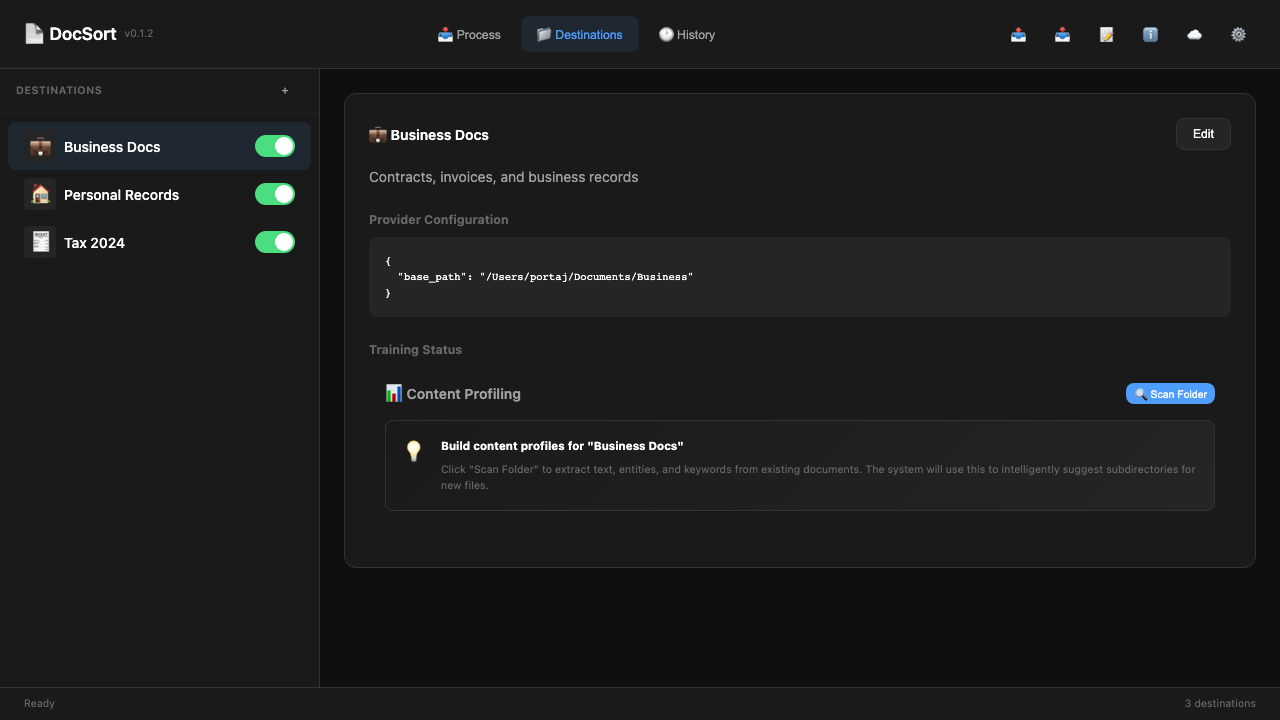
You describe where things go
12 / 22Destinations, not tags.
Point at a folder. Give it a name and a description. That's the spec.
You can have one catch-all or a dozen specific buckets. Each destination is just a real folder on disk, scanned for context.
Your existing filenames are the spec
13 / 22It learns from
your mess.
DocSort scans the destination folder and extracts patterns from names that are already there.
Your convention — even an accidental one — becomes the blueprint. No template to write.
Classification, hand-wavey
14 / 22Seven signals: a committee decision, not a dictatorship.
Each destination collects points across 7 signals. Every signal is hard-capped so no one can railroad the decision. Top score wins — if it clears 40%.
If nothing's confident, DocSort refuses to guess. The file sits in your queue until you decide.
Without them, a name-match for "LLC" would drag every business doc into one folder. Caps keep signals honest — global entities inflate no scores at all.
Two levers of control
15 / 22Global entities & linked entities.
Global · soft touch
Your cheat sheet
Names, places, and vendors your app should know about — but not route on.
- Your name and family members
- Your home address
- Cross-business vendors:
Home Depot,IRS
Makes the AI smarter. Standardizes names on output. Doesn't force a filing decision.
Linked · hard rule
Strict routing
Entities that belong to exactly one folder — when matched, confidence jumps 60%.
- A specific LLC:
Gatsby Ventures, LLC - An account number:
Acct: 25067771 - A property address:
1603 Howard Ave
Use sparingly. The heavy hammer, for text that means exactly one destination.
The permission to not decide
16 / 22"Needs review" is
a first-class state.
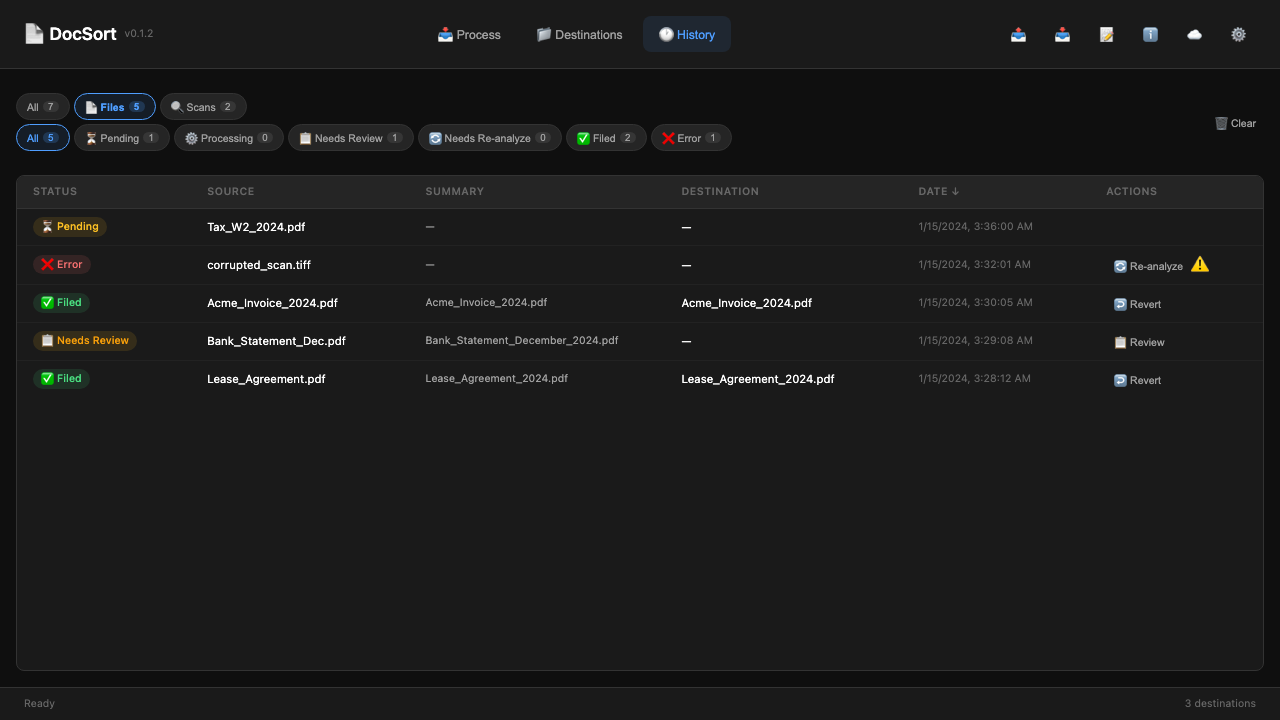
If DocSort isn't confident, it won't guess. Your file sits in a review queue — scanned, read, understood, but unfiled — until you want to deal with it.
The pile is processed without being decided. This is the line that lets ADHD brains scan.
Time travel, by default
17 / 22Every decision is revertable.
History is a full job log. Every analysis, every scan, every filing.
Jump back to any file, see what DocSort thought, change its mind. Nothing is a commitment.
Privacy
18 / 22Your files don't leave your machine.
Only the extracted text snippets get sent to the AI provider you chose — with your own API key. Or run it fully offline.
100% on-device. Nothing leaves your network. Slower, cheaper, fully private.
Extracted text only, sent with your key. Enterprise APIs don't train on your data by default.
DocSort has no server. Nothing flows through us. There's no "us" to flow through.
Design principle
19 / 22Good defaults.
High ceiling.
Drop a file — it just works. But when you want control, every knob is there.
What it runs on
20 / 22A real native app.
Not a web app wearing a costume.
Small native binaries, not Electron.
Fast, safe, gets out of the way.
Local job store. One file. Inspectable.
Claude, OpenAI, or local Ollama.
Honest status
21 / 22Early, but real.
This is a finalizing-for-release build. I use it daily on a ~9,000-file corpus across 5 destinations.
Rough edges exist. It's open source. I'd rather have five people use it and tell me it's wrong than polish in a vacuum.
One ask
Point it at a folder.
Drop something in.
Tell me what breaks. Tell me what feels right. That's the ask.